
AI can help you write faster, fix grammar mistakes, and make awkward sentences clearer. The problem is that many people use it in a way that flattens their voice. The result sounds polished on the surface but generic underneath. This guide tries to answer the query: How to Use AI to Improve Your Writing Without Sounding Robotic?
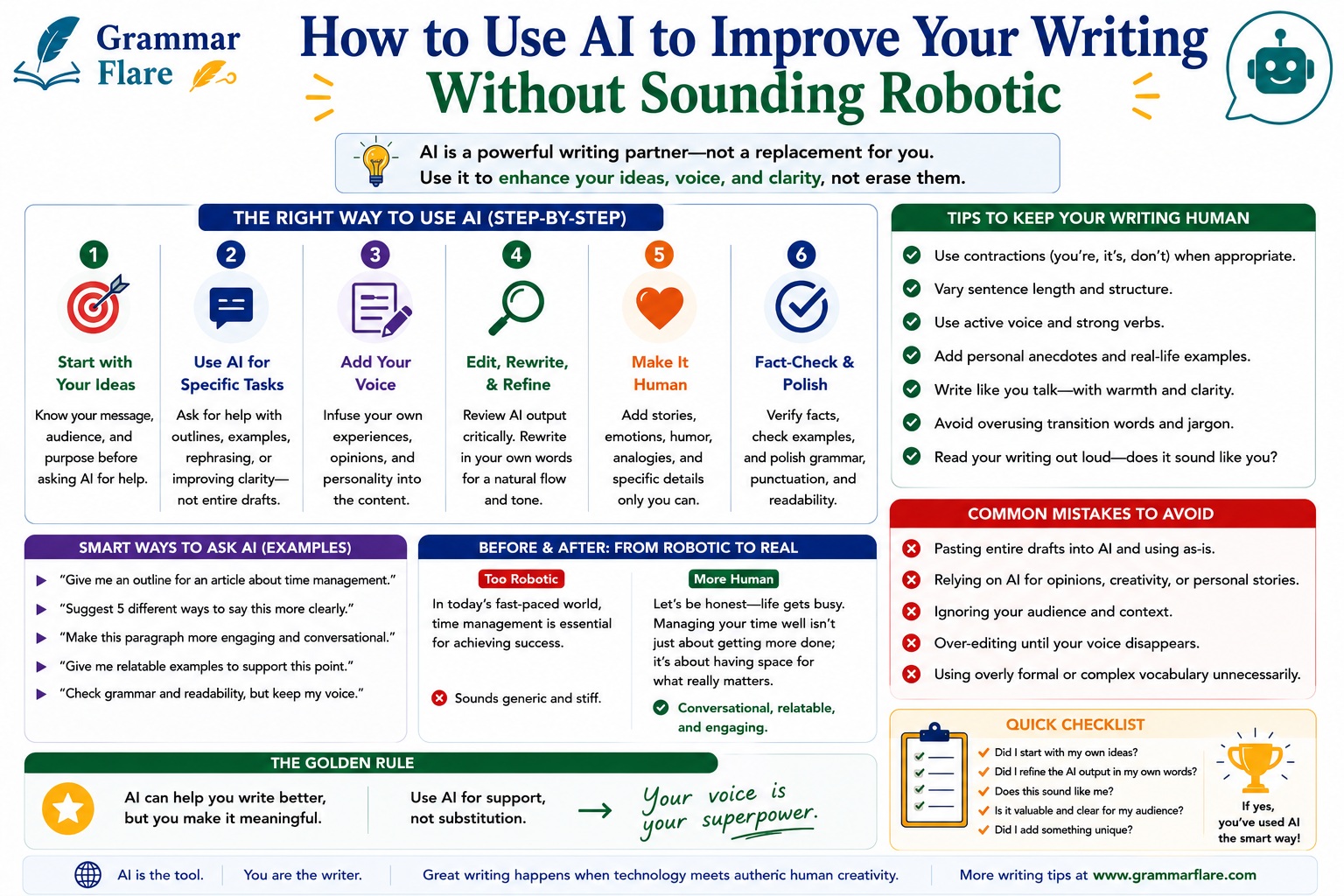
The better approach is simple: use AI as an editor, not a substitute personality. Give it your idea, your rough draft, or your real details first. Then ask it to diagnose problems, offer options, and help you revise. If you want more rule-based help after this article, GrammarFlare’s Grammar basics archive is the strongest next category to explore.
Quick Answer
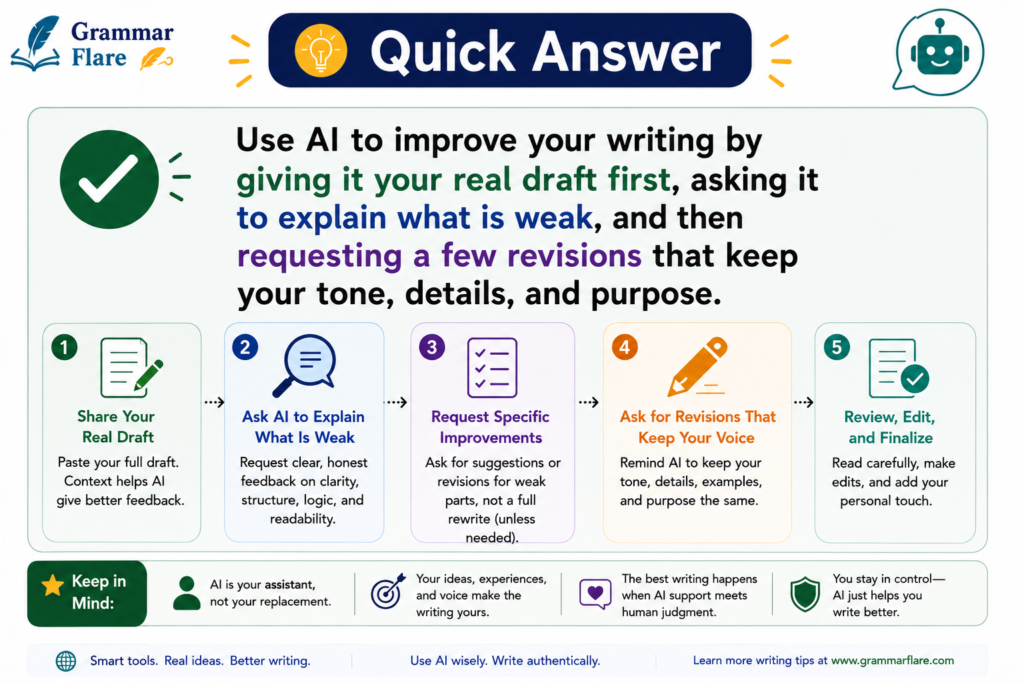
Use AI to improve your writing by giving it your real draft first, asking it to explain what is weak, and then requesting a few revisions that keep your tone, details, and purpose.
The short version:
- start with your own message, notes, or rough draft
- ask AI to diagnose clarity, grammar, and tone issues before rewriting
- give it audience and voice instructions
- ask for two or three rewrite options instead of one final answer
- keep specific examples, facts, and human details from your original draft
- remove cliches, filler, and repetitive AI phrasing
- do a final human pass before publishing or sending
The Main Rule in One Sentence
AI should improve your writing decisions, not replace them.
If the tool is doing all the thinking, the result usually sounds generic.
Why AI Writing Often Sounds Robotic
Most robotic writing comes from one of five problems:
1. The prompt is too vague
If you ask AI to “make this better,” it usually falls back on safe, generic language.
2. There is no real source material
When AI has to invent the message from scratch, it fills the space with broad, predictable sentences.
3. The writing loses concrete details
Real writing includes specific names, situations, examples, and priorities. Robotic writing removes them.
4. The tone becomes too polished
AI often overuses phrases like:
in today's fast-paced worldit is important to notedelve intonavigateleverage
These phrases are not always wrong, but they quickly make writing sound artificial.
5. No one edits the final version
The first AI output is often usable as a draft, not as the final answer.
The Best Way to Use AI for Writing Improvement
1. Start with your own rough draft or notes
Even a messy draft is better than an empty prompt.
Instead of this:
Write an email asking for deadline flexibility.
Start with this:
I need to ask my manager for two more days because the client changed the scope and I want to sound responsible, not defensive.
That gives AI something real to work with.
2. Ask for diagnosis before rewrite
This is one of the most useful habits.
Ask AI:
Read this draft and tell me what sounds unclear, repetitive, too formal, too casual, or unlike natural American English. Do not rewrite it yet.
This keeps you in control. You see the issues first, then decide what to change.
3. Tell AI who the reader is
Writing changes depending on the situation.
Good context includes:
- who will read it
- what you want them to do
- how formal it should sound
- what tone to avoid
Example:
Rewrite this for a coworker. Keep it polite, direct, and warm. Avoid sounding stiff or overly enthusiastic.
4. Give a short voice sample
If you want natural results, show the tool how you normally sound.
You can paste:
- one or two paragraphs from your own writing
- a recent email you liked
- a short note describing your style
Example:
Match this voice: clear, simple, practical, and friendly. Avoid corporate buzzwords and dramatic wording.
5. Ask for options, not one final version
One rewrite usually locks you into the AI’s default rhythm. Options give you control.
Try:
Give me 3 versions: one more direct, one warmer, and one more concise. Keep my meaning and examples.
This is especially useful if you also want smoother phrasing. Readers who care about tone and phrasing may want GrammarFlare’s Better Ways to Say Things category after this article.
6. Keep the details only you know
AI can improve structure and clarity, but your examples, experience, and priorities are what make the piece sound human.
Keep:
- real anecdotes
- exact stakes
- specific examples
- brand language that actually fits your voice
- subject knowledge that the tool could not guess
7. Cut filler before you publish
Look for:
- repeated sentence openings
- overly balanced sentence patterns
- stacked adjectives
- empty transitions
- words that sound more impressive than useful
If a sentence feels smooth but forgettable, it probably needs a human edit.
A Simple AI Writing Workflow That Sounds Natural
Use this order:
Step 1. Draft the idea yourself
Write the rough message in plain language.
Step 2. Ask AI to diagnose the draft
Find grammar, clarity, tone, and structure problems.
Step 3. Ask for 2 to 3 revisions
Keep the best wording from each version.
Step 4. Reinsert your real details
Names, numbers, examples, and priorities should come from you.
Step 5. Do a final human check
Read it out loud and remove anything that sounds generic, inflated, or unlike you.
Copy-and-Paste Prompts That Work Better
1. Diagnostic pass
Review this draft. Tell me what sounds unclear, awkward, too formal, too casual, repetitive, or robotic. Explain the issues in bullets. Do not rewrite it yet.
2. Voice-preserving rewrite
Rewrite this draft so it sounds natural and confident. Keep my meaning, examples, and level of formality. Avoid cliches, filler, and corporate buzzwords. Give me 3 versions: direct, warm, and concise.
3. ESL clarity prompt
I am an English learner. Rewrite this in simple, natural American English. Keep the meaning the same. If a phrase sounds unnatural, explain why and offer a clearer option.
4. Final proofreading prompt
Proofread this for grammar, punctuation, word choice, and natural flow. Keep my voice. Flag anything that sounds AI-written or overly generic.
Before-and-After Examples
Example 1: Work email
Original draft:
I am writing to inform you that I would greatly appreciate a short extension because some project details changed and I want to ensure the final work meets expectations.
Natural revision:
The project scope changed this week, so I would like to ask for a two-day extension. That extra time would help me deliver the final version at the quality you expect.
Why the revision works:
- shorter and clearer
- more specific
- less inflated
- sounds like a real person
Example 2: Blog introduction
Original draft:
In today’s digital landscape, writers are increasingly leveraging artificial intelligence tools to enhance their content creation processes in meaningful and impactful ways.
Natural revision:
More writers are using AI to speed up drafting and editing. The challenge is getting the help without letting the writing sound generic.
Why the revision works:
- removes cliches
- uses simpler verbs
- gets to the point faster
- sounds more like spoken English
Example 3: ESL learner sentence
Original draft:
My manager explained me the report needs more precise wording.
Natural revision:
My manager explained that the report needs more precise wording.
Extra note:
AI is especially useful when it can explain why something sounds unnatural. That makes it a learning tool, not just a correction tool. Readers who want more sentence-level vocabulary help can also browse GrammarFlare’s Commonly Confused Words category.
What AI Is Best At in Writing
AI is most useful when the task is narrow and clear.
Good use cases:
- checking grammar and punctuation
- simplifying long or awkward sentences
- changing tone for a specific audience
- rewriting one paragraph in plainer English
- generating outline options
- spotting repetition
- proofreading for clarity
Less reliable use cases:
- producing original insight without your input
- inventing facts, citations, or examples
- matching your brand voice without samples
- making final legal, medical, or policy judgments
How to Keep Your Writing Human
Keep at least one sentence that sounds like you
When every sentence is evenly polished, the writing often loses personality.
Prefer concrete language
Specific language beats abstract language.
Less human:
We aim to optimize communication outcomes across multiple touchpoints.
More human:
We want our emails, pages, and support replies to sound clearer and more helpful.
Read the final version out loud
If you would not say it that way, you probably should not publish it that way.
Check whether the emotional temperature fits
Robotic writing is often too flat or too formal. For more natural relationship-driven language, GrammarFlare’s Conversation Skills category is a strong follow-up.
Common Mistakes to Avoid
| Mistake | Why it hurts | Better move |
|---|---|---|
| asking for a full article from scratch | creates generic copy fast | bring your own outline or examples first |
| accepting the first rewrite | keeps AI rhythm and filler | ask for options and combine the best parts |
| removing all personal details | makes the piece forgettable | keep your real examples and goals |
| using AI without audience context | tone becomes mismatched | define reader, purpose, and tone |
| trusting AI facts automatically | can introduce errors | verify names, numbers, and claims |
| overediting for polish | can flatten voice | leave natural variation where it helps clarity |
A Quick Checklist Before You Publish
Ask:
- Does this sound like a person I would trust?
- Are the details specific enough to feel real?
- Did I remove empty phrases and buzzwords?
- Are the facts, names, and dates verified?
- Does the tone fit the reader?
- Did I keep my original point instead of letting AI change it?
- Would I say at least part of this out loud in real life?
Can AI Help With Grammar Without Hiding the Learning?
Yes, if you use it the right way.
For grammar improvement, ask AI to:
- identify the mistake
- explain the rule in simple language
- show one corrected version
- show one alternative phrasing
That teaches you something. It is better than blindly accepting a rewrite.
If the issue is noun forms, countability, or irregular plurals, GrammarFlare’s Plural Nouns category is a useful next category to link from this article.
FAQ
Is it okay to use AI to improve my writing?
Yes. AI can be a useful editing tool for grammar, clarity, structure, and tone. The safest approach is to use it to improve your draft, not to replace your thinking.
Why does AI writing sound robotic?
AI writing usually sounds robotic when the prompt is vague, the content is too generic, the details are missing, or the first draft is published without human editing.
How do I make AI writing sound more human?
Give AI your real draft, define the audience and tone, ask for options instead of one final version, keep concrete details, and do a final human pass out loud.
Can AI help English learners write more natural sentences?
Yes. It can help explain unnatural phrasing, correct grammar, and suggest simpler wording. It is most useful when it explains why a sentence sounds off.
Should I let AI write the whole article for me?
Usually no. AI is strongest as a drafting or editing assistant. Articles sound more trustworthy when the ideas, examples, and final judgment come from a human writer.
Short Answers for Quick Overviews
These concise restatements are suitable for excerpt boxes, summaries, and AI-answer surfaces:
- Best quick answer: Use AI to improve writing by starting with your own draft, asking for a diagnosis first, then requesting a few revisions that keep your tone and specific details.
- Fast workflow: draft, diagnose, rewrite, personalize, proofread.
- Best use case: AI is strongest at grammar checks, clarity edits, tone adjustment, and paragraph-level rewrites.
- Biggest mistake to avoid: publishing the first AI version without checking facts, tone, and voice.
Read More at GrammarFlare
- AI & Writing Tools
- Grammar Basics
- Better Ways to Say Things
- Commonly Confused Words
- Conversation Skills
- Plural Nouns
Sources
- Google Search Central: AI features and your website
- Google Search Central: Google’s guide to optimizing for generative AI search
- PlainLanguage.gov: Write for your user
- Purdue OWL: Proofreading