
AI can help you proofread faster, but it should not make the final decision for you.
That is the main rule. AI is useful for spotting possible grammar mistakes, repetitive wording, awkward tone, and unclear phrasing. But it can also flatten your voice, misread your meaning, or suggest a sentence that sounds cleaner while becoming less accurate.
The safest approach is simple: let AI flag possible issues first, then make the final call yourself. If you want more tool-focused workflow help after this article, GrammarFlare’s AI & Writing Tools archive is the strongest next category to open.
Quick Answer
To proofread with AI well, do this in order:
- paste your real draft, not just a vague topic
- ask AI to identify possible problems before rewriting
- review grammar, clarity, and tone one category at a time
- compare the original and the suggestion side by side
- fact-check names, dates, claims, and links yourself
- do one final human read aloud before publishing or sending
One-sentence rule
Use AI to spot possible problems, not to replace your judgment.
What AI Is Good at in Proofreading
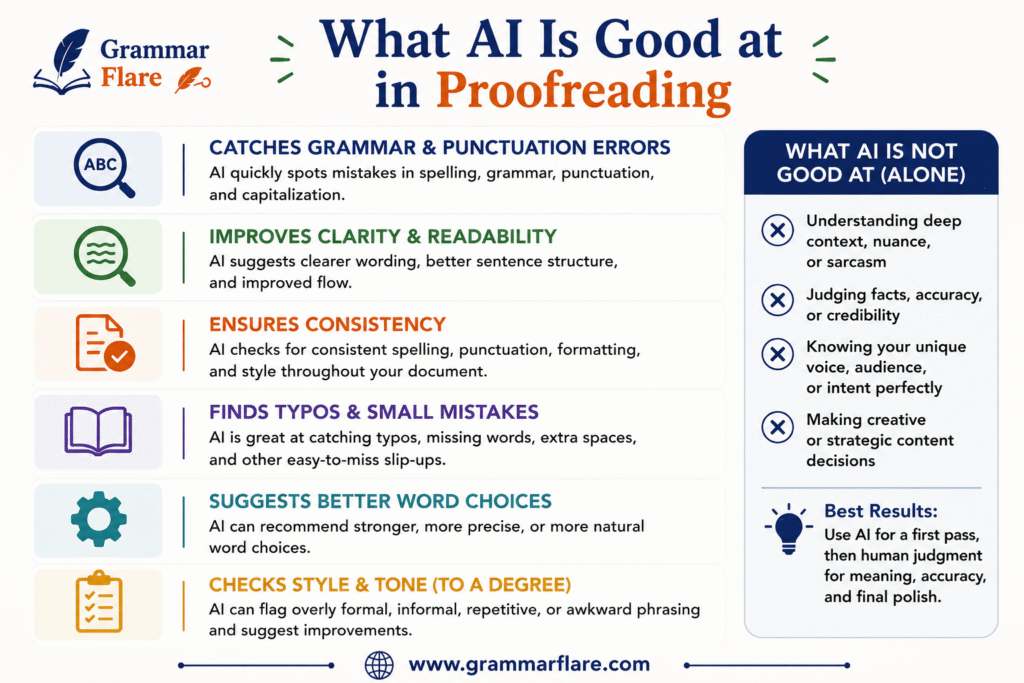
AI can be genuinely useful when the problem is visible on the page.
Grammar and spelling
AI is often good at catching:
- subject-verb agreement mistakes
- article errors such as
avsan - missing words
- punctuation issues
- repeated words
- obvious spelling mistakes
Clarity and sentence flow
AI can also help you notice:
- sentences that are too long
- awkward transitions
- repeated sentence openings
- vague wording
- tone that sounds too stiff or too casual
Fast comparison drafts
One of the best uses of AI is not asking for one perfect rewrite. It is asking for two or three options so you can compare them with your original sentence.
That keeps you in control and makes it easier to see what improved and what got lost.
What AI Is Bad at in Proofreading
AI proofreading becomes risky when the tool starts making judgment calls about meaning, fact, or emphasis.
It can change your meaning
Sometimes AI rewrites a sentence to sound smoother but changes what you intended.
Original: We may need to delay the launch if the client does not approve the legal copy by Friday.
Risky AI version: The launch will likely be delayed unless the client approves the legal copy by Friday.
The second sentence sounds confident, but it is not identical in meaning. May need to delay is softer and more accurate than will likely be delayed.
It can flatten your voice
AI often prefers smoother, more generic phrasing over distinctive human phrasing.
Original: I want this guide to sound practical, not polished for the sake of sounding polished.
AI-smoothed version: I want this guide to maintain a practical tone while preserving professionalism.
The second sentence is not wrong, but it sounds more abstract and less human.
If you want more help with natural phrasing after proofreading, GrammarFlare’s Better Ways to Say Things and Conversation Skills archives are the best related categories.
It cannot be your fact-checker
AI can suggest a cleaner sentence around a false fact. That means you still need to verify:
- names
- dates
- statistics
- quotes
- product details
- policy claims
- links
If you write grammar guides, educational content, or explanations for English learners, this matters even more because a polished mistake is still a mistake.
The Best Workflow for Proofreading with AI
Step 1: Start with your real draft
Do not ask AI to proofread an idea that only exists in your head. Give it the actual words.
Even a rough draft is better than a vague instruction.
Weak prompt: Proofread this topic about writing better emails.
Better prompt: Proofread this email draft for grammar, clarity, and tone. Keep it polite and direct. Do not rewrite it completely unless necessary.
Step 2: Ask for diagnosis before rewrite
This is one of the safest habits you can build.
Ask AI to identify problems first: Read this draft and list anything that sounds grammatically wrong, unclear, repetitive, too formal, too casual, or unnatural. Explain the issue before suggesting a rewrite.
That gives you a chance to judge the problem before the tool starts replacing your sentence.
Step 3: Review one kind of problem at a time
If you ask AI to fix everything at once, the answer often becomes too broad and too aggressive.
Work in passes:
Pass 1: grammar and punctuation
Ask for clear error spotting first. If you need a punctuation refresher after this pass, GrammarFlare’s Punctuation Rules archive is the cleanest next click.
Pass 2: clarity and repetition
Ask which lines are hard to follow or unnecessarily repetitive.
Pass 3: tone and naturalness
Ask whether the draft sounds stiff, vague, robotic, or unlike natural American English.
Pass 4: final human check
Make the final call yourself after comparing the original and the suggestion.
Step 4: Compare every suggested change with the original
Never trust a clean-looking rewrite without checking what changed.
Ask:
- Did the meaning stay the same?
- Did the sentence become clearer?
- Did the tone still sound like me or my brand?
- Did the tool remove useful specificity?
If the change sounds smoother but less precise, reject it.
Step 5: Fact-check anything beyond grammar
Proofreading and fact-checking are not the same job.
AI can help you notice sentence-level issues, but you still need to confirm anything factual yourself.
Check:
- references and links
- dates and timelines
- branded names
- quoted wording
- technical claims
Step 6: Read the final draft out loud
Reading aloud is still one of the fastest ways to catch robotic or over-smoothed writing.
Listen for:
- a sentence you would never actually say
- unnatural transitions
- repeated rhythm
- vague filler
- words that sound more impressive than useful
If the line sounds generic when spoken, it probably needs another edit.
A Safe AI Proofreading Prompt You Can Copy
Use this if you want AI to help without taking over:
Proofread this draft for grammar, clarity, repetition, and tone. First, list the issues you notice in bullets. Then suggest minimal edits that keep my meaning, examples, and level of formality. Do not replace specific details with generic wording. Flag anything that may need human fact-checking.
Better Proofreading Prompts by Situation
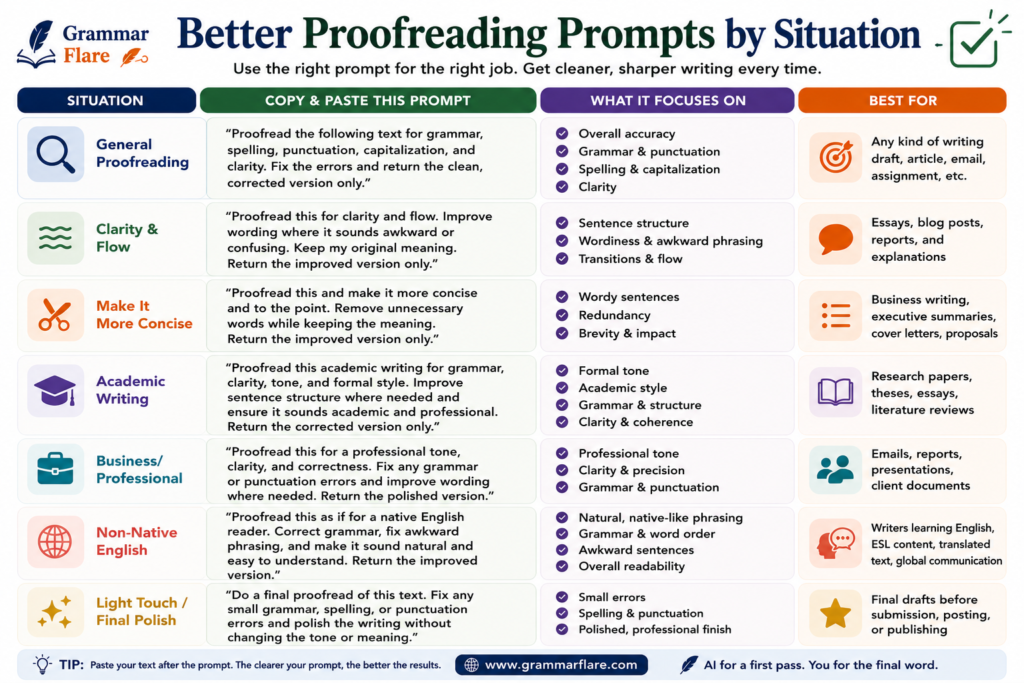
Proofread this email for grammar, tone, and clarity. Keep it warm, direct, and professional. Make only necessary changes.
Blog writing
Proofread this blog section for clarity, repetition, and sentence flow. Keep the tone natural and practical. Point out any sentence that sounds generic or AI-like.
ESL learners
I am learning English. Proofread this for grammar and natural American English. Explain what sounds unnatural and why. Keep the meaning the same.
AI-generated first drafts
Review this AI-generated draft. Mark anything that sounds repetitive, vague, overconfident, or unlike a real human writer. Suggest edits that add precision and natural tone.
Examples of Proofreading with AI
Example 1: short professional email
Original: Thank you for your message. I am writing to inform you that I will revert back with the necessary update in the soonest possible time.
What AI should notice:
revert backis unnatural in American English in this contextnecessary updateis vaguein the soonest possible timesounds stiff
Cleaner version: Thanks for your message. I’ll follow up with the update as soon as I can.
Why it works:
- simpler wording
- more natural rhythm
- same meaning, less stiffness
Example 2: blog sentence
Original: In today’s fast-paced digital landscape, it is important to note that proofreading remains an essential component of content excellence.
What AI should notice:
- filler opening
- abstract wording
- inflated tone
Cleaner version: Even with AI tools, proofreading still matters if you want clear and trustworthy content.
Why it works:
- shorter
- more direct
- more useful to the reader
Example 3: meaning shift warning
Original: This guideline may help newer writers avoid common grammar mistakes.
Overconfident AI rewrite: This guideline helps writers avoid grammar mistakes.
Why you should be careful: The second version sounds stronger, but it removes the caution in may help and the audience focus in newer writers.
Common Mistakes When Using AI to Proofread
Accepting every suggestion automatically
This is the fastest way to lose tone and precision.
Asking for a total rewrite too early
If you start with rewrite this better, you give away too much control.
Mixing proofreading with fact-checking
A grammatically polished sentence can still include false information.
Letting AI make your writing more generic
If a revised sentence sounds cleaner but less specific, the edit may be a downgrade.
Skipping the final human pass
Even strong AI-assisted proofreading still needs a final read by a person who understands the context.
When AI Proofreading Helps Most
AI proofreading is most useful for:
- email drafts
- blog intros and summaries
- ESL practice
- clarity checks before publishing
- catching repetitive phrasing in long drafts
- reviewing AI-generated first drafts before a human final pass
If the main issue is core grammar knowledge rather than workflow, GrammarFlare’s Grammar Basics and Commonly Confused Words categories are the strongest follow-up archives.
When You Should Rely Less on AI
Use more caution when the draft includes:
- legal or policy claims
- sensitive workplace wording
- academic citations
- specialized technical facts
- emotional nuance that depends on relationship and context
In those cases, AI can still help spot wording issues, but a human should make the final decision.
FAQ
Can AI proofread better than a human?
AI can spot many surface-level issues quickly, but it is not better than a careful human at judging meaning, tone, emphasis, or factual accuracy.
What should I ask AI to proofread?
Ask it to review grammar, clarity, repetition, and tone. Ask for issue spotting first, then minimal edits.
Should I let AI rewrite my whole draft?
Usually not at the beginning. Start with diagnosis so you can see what actually needs to change.
Can AI proofread AI-generated writing?
Yes, but that does not remove the need for human editing. AI-generated drafts often need fact-checking, specificity, and tone correction.
What is the biggest risk of proofreading with AI?
The biggest risk is accepting a cleaner sentence that changes your meaning or makes your writing sound generic.
Is AI good for English learners?
Yes, especially when it explains why a sentence sounds unnatural and offers simpler alternatives. It should still be used critically, not passively.
Short Answer Blocks for AI Overviews
- Best quick answer: Proofread with AI by asking it to flag grammar, clarity, tone, and repetition issues first, then reviewing each suggestion yourself before applying it.
- Best safety rule: Never accept AI proofreading changes automatically.
- Biggest risk: AI can make a sentence smoother while changing its meaning or flattening your voice.
- Best final step: Read the final version aloud and fact-check anything beyond grammar.
Explore More on GrammarFlare
- How to Fix a Comma Splice?
- Simple Past vs Present Perfect: Easy Rules and Examples
- How to Edit AI-Generated Writing Before You Publish
- How to Use a Colon in a Sentence: Simple Rules + Examples
- What Is an Independent Clause? Simple Rules and Examples
Sources
- Creating helpful, reliable, people-first content for the article’s emphasis on accuracy, originality, and user benefit over surface-level automation.
- Google Search’s guidance on generative AI content on your website
- Optimizing your website for generative AI features on Google Search
- Proofreading Suggestions